Three trackers, three theories of work
Every issue tracker encodes a theory about how engineering teams should work, and the price per seat is the cheapest part of choosing wrong. Linear’s theory is that a product team moves fastest when the tool makes most process decisions for it: cycles, triage, and keyboard-first speed over configuration. Jira’s theory is that a large organization moves safely when process is explicit, auditable, and configurable per team. ClickUp’s theory is that one workspace should hold every kind of work, so engineering, product, marketing, and operations stop paying for five tools.
This comparison tests all three against the same yardsticks: the vendor’s own pricing page, the free tier’s real ceiling, the per-seat cost at 25 and 100 seats, and the workflow limit that eventually forces a team off each tool. All prices below were read from the vendors’ pricing pages in November 2026; vendors reprice without notice, so re-check the page before signing, and treat any figure here as a snapshot with a date, not a quote.
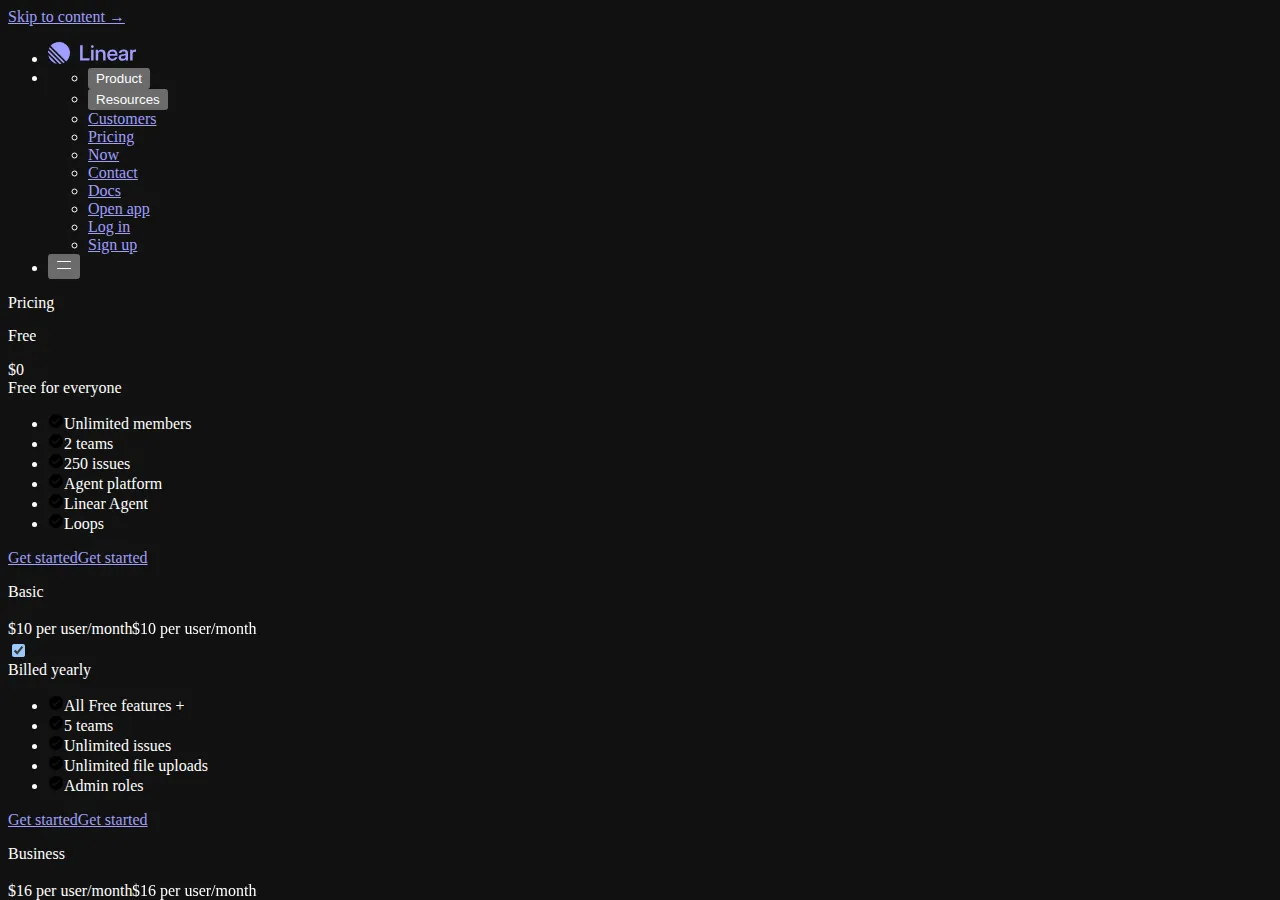
The pricing table, from the vendors’ own pages
| Vendor | Free tier | First paid tier | Next tier up | Billing note from the page |
|---|---|---|---|---|
| Linear | $0, unlimited members, 2 teams, 250 issues | Basic, $10 per user per month | Business, $16 per user per month | Basic and Business shown billed yearly |
| Jira | $0, free for 10 users | Standard, $8.48 per user per month | Premium, $15.56 per user per month | Figures from the page’s structured pricing data, monthly billing |
| ClickUp | $0, Free Forever, no credit card required | Core, $9 per user per month (regular price $12) | Business, $17 per user per month | Core shown billed yearly; page advertises up to 33 percent saving with yearly billing |
Two reading notes before the math. First, Jira’s $8.48 and $15.56 figures are the monthly-billing values carried in the pricing page’s own structured data; Atlassian discounts annual billing below those figures, so any annual total computed from them is an upper bound for Jira, not its annual price. Second, ClickUp’s page now names its tiers Free, Core, Business, Enterprise, and Max; older comparisons that quote “Unlimited” and “Business” pricing are describing a retired naming scheme, and a buyer who budgets from an old blog post will misprice the purchase.
The per-seat math at 25 and 100 seats
At 25 seats on the first paid tier:
At 100 seats the same formula gives Linear Basic $12,000, ClickUp Core $10,800, and Jira Standard $10,176 on the monthly-billing figure. The spread at 100 seats is $1,824 a year between the cheapest and dearest first-tier options — real money, but less than one week of one engineer’s loaded cost, and smaller than the migration cost of switching tools mid-year, which the next section prices.
The next tier up compresses the spread further. Linear Business at $16, ClickUp Business at $17, and Jira Premium at $15.56 per user per month sit within $1.44 of each other, so a team that needs the second tier for permissions, roadmapping, or automation depth should stop comparing first-tier prices entirely and compare what the second tier unlocks: Linear’s unlimited teams and admin roles, Jira’s advanced roadmaps and cross-project planning, ClickUp’s broader workspace controls. The vendor whose second tier matches the team’s actual bottleneck wins, regardless of the $1.44.
The free-tier ceilings that actually bind
Free tiers are not trials with a time limit; they are walls with a shape, and the shape decides which teams can live on them. Linear’s wall is issue count: 250 issues with unlimited members and 2 teams. A two-person side project lives inside it indefinitely. A five-person product team shipping weekly crosses 250 issues in a few months, and then faces a choice between paying and archiving history it will want during the next incident review. Jira’s wall is headcount: 10 users, free forever. A team of 11 pays for all 11 seats on Standard, not just the 11th, because the free tier ends at ten. ClickUp’s wall is feature depth rather than a single number on the pricing page: the $0 tier exists and requires no credit card, but the workspace features that make ClickUp attractive — advanced automations, goals, and permissions — sit above it, so a team that adopts ClickUp for breadth discovers the paywall inside the features it adopted the tool for.
The honest free-tier test is therefore a workload test, not a price test. Run the team’s real backlog through the free tier for two weeks: count issues created, members added, and automations triggered. If any counter approaches its ceiling in that window, the free tier is a demo, and the budget conversation should start from the paid tier the team will actually land on.
The workflow ceilings: why teams actually switch
Linear’s ceiling is process breadth. A single product team with one roadmap, one release train, and one definition of done will never touch it. An organization with twenty teams, portfolio-level roadmapping, hardware compliance gates, and audit trails per change will build workarounds — external roadmaps, spreadsheet program boards, manual status rollups — until the workaround stack costs more than Jira’s configuration overhead. The signal is not complaints about Linear; it is the shadow tooling that appears around it.
Jira’s ceiling is configuration drag. Every workflow state, screen, permission scheme, and automation rule is configurable, which means every team’s Jira instance drifts toward a bespoke snowflake that only two people understand. The signal is the onboarding conversation: when a new engineer’s first week includes a Jira orientation, or when a simple status change requires an administrator, the tool’s power has become the team’s tax. Jira Premium’s advanced roadmaps and cross-project features repay that tax at program scale; below that scale, they are shelfware.
ClickUp’s ceiling is engineering depth assembled from general parts. Docs, goals, time tracking, chat, and tasks in one workspace genuinely replace several subscriptions for a small company, and the API, webhooks, and automation builder cover the common integrations. But an engineering team that lives in Git workflows, cycle analytics, and triage discipline will assemble those from ClickUp’s general primitives — custom fields, statuses, and automations — and maintain the assembly forever. The signal is the automation count: when the team’s ClickUp automation list becomes a second codebase with its own bugs, the everything-app has quietly become a platform the team now operates.
The migration math nobody budgets
Switching trackers is priced in the planning spreadsheet as a subscription delta and experienced as a migration project. The following model is illustrative, using the team’s own rates, and exists so the subscription comparison is never read in isolation:
At 25 seats, two hours per person of migration, training, and workflow rebuild at a $75 loaded rate, plus a $1,500 parallel-run allowance for the month both tools run side by side, the switch costs $5,250 — more than the entire first-year price spread between any two first-tier options at that headcount. The conclusion is uncomfortable and useful: at small scale, picking the wrong tracker and switching costs more than picking the dearest tracker and staying. The subscription ranking matters most at 100-plus seats, where the annual spread crosses five figures and the migration cost amortizes over a larger base. To test the switch against a team’s own headcount and rates, run the migration figure through the break-even calculator alongside the subscription totals.
Decision table
| Decision factor | Linear | Jira | ClickUp |
|---|---|---|---|
| Best for | A single product team that values speed and opinionated process | A large or regulated organization that needs explicit, auditable process | A small company that wants one workspace for every kind of work |
| Free-tier wall | 250 issues, 2 teams | 10 users | Feature depth above the $0 tier |
| First paid tier | Basic, $10 per user per month, billed yearly | Standard, $8.48 per user per month, monthly-billing figure | Core, $9 per user per month, billed yearly |
| Second tier | Business, $16, unlimited teams and admin roles | Premium, $15.56, advanced roadmaps and program planning | Business, $17, broader workspace controls |
| Switch signal | Shadow roadmaps and rollups appearing outside the tool | New hires needing a Jira orientation to change a status | An automation list becoming a second codebase |
| Vendor evidence | Linear pricing page, November 2026 | Atlassian pricing page structured data, November 2026 | ClickUp pricing page, November 2026 |
Execution checklist
- [x] Phase 1: Run the free tier on real work for two weeks. Count issues, members, and automations against the ceilings above before any paid conversation.
- [x] Phase 2: Price the tier the team will actually land on. Budget the second tier if permissions, roadmapping, or automation depth is on the requirements list, not the first tier the pricing page leads with.
- [x] Phase 3: Name the switch signal in advance. Write down the workaround that would prove the choice wrong, and review it quarterly, so the switch decision is evidence-based instead of fashion-based.
- [x] Phase 4: Cost the migration before the subscription. Add the migration model above to any switch proposal; a switch that saves $1,824 a year and costs $5,250 to execute needs a workflow reason, not a pricing reason.
- [x] Phase 5: Re-check prices at signing. Vendor pages reprice without notice, and the figures in this guide are a November 2026 snapshot; confirm the live page and the billing cadence before committing.
Founder & CEO Insight — Enow A. Jovial
Operator boundaries: who should not pick each tool
Do not pick Linear if the organization’s audit file requires per-change approval chains across programs, if portfolio roadmapping spans dozens of teams with dependencies the tool cannot model, or if the team’s process is mandated by a customer contract rather than chosen by the team. Do not pick Jira if the team is under ten people with one roadmap, because the configuration overhead will exceed the process value and the team will route around the tool within a quarter. Do not pick ClickUp as a pure engineering tracker if the team’s core workflow is Git-native cycles and triage discipline, because assembling that depth from general primitives is a permanent maintenance cost disguised as flexibility.
Related reading on this site: the AI code review guide for automated PR QA with GitHub Actions for the review automation that feeds the tracker, and the AI workflow automation guide for n8n, Make, and Zapier for the automation layer that connects it. To test a switch against the team’s own headcount and rates, run the migration figure through the break-even calculator. For general project management pricing outside engineering trackers, see our Asana vs Monday vs Trello guide, which runs the same seat-count math at 5, 25, and 100 seats.
For the chat half of the same stack, the Slack vs Microsoft Teams vs Discord pricing guide prices all three at 5, 25, and 100 seats.
Engineering standups run on video calls — the Zoom vs Google Meet vs Teams pricing playbook prices the meeting stack at 5, 25, and 100 seats.
Meeting scheduling has the same unit problem — the Calendly vs Acuity scheduling pricing comparison prices seats against accounts.
Automate the handoffs between these trackers with the n8n vs Zapier vs Make pricing guide.
For the API layer behind the same stack, the Postman vs Insomnia vs Bruno pricing guide prices the three clients at 5, 25, and 100 seats.
Design tools price the same way issue trackers do — per seat, per month, with the free tier as the funnel: our Canva vs Figma vs Adobe Express design tool pricing playbook runs the per-seat math at 5, 25, and 100 seats.
For a broader pricing comparison across the project-management category, see our Notion vs ClickUp vs Asana project management pricing playbook.