A 25-person team pays $2,175 a year for Slack Pro, $1,200 a year for Microsoft Teams Essentials, or $2,997 a year if every member buys Discord Nitro themselves — and only one of those three bills comes with an admin console, a contract, and a way to remove someone who leaves. The three products answer the same question — where does the team talk — with three different business models: Slack sells seats, Microsoft sells a suite that happens to include chat, and Discord sells perks to individuals. This guide prices all three ladders, the ceilings that force an upgrade, and the arithmetic that decides which bill is real for a team of 5, 25, or 100.
The three products, in one paragraph
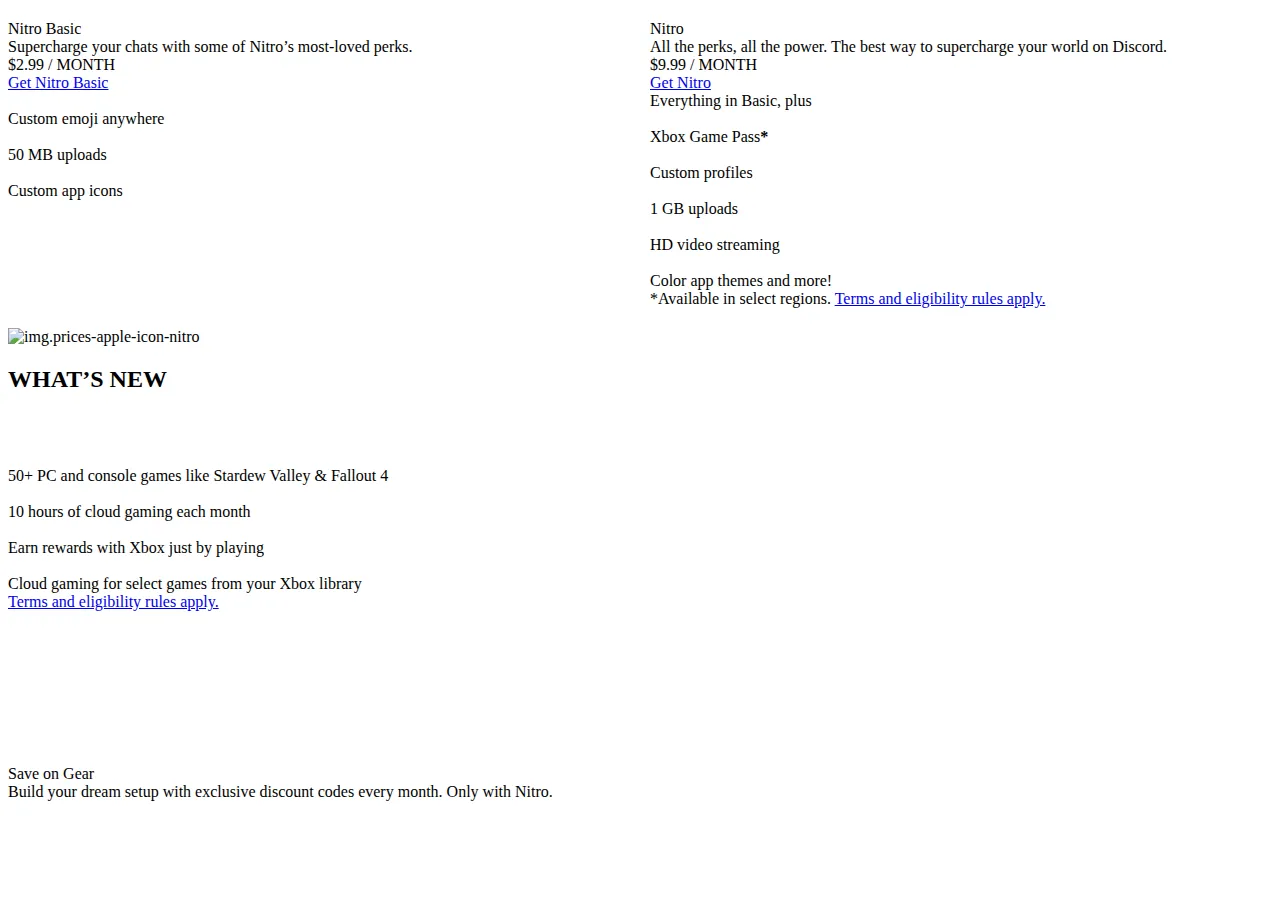
Slack is a SaaS work chat product sold per seat: a free tier with 90 days of message history and up to 10 apps, Pro at $7.25 per user per month on annual billing, Business+ at $15, and Enterprise Grid by quote. Microsoft Teams is sold two ways: standalone as Teams Essentials at $4 per user per month on annual billing, or bundled inside Microsoft 365 Business Basic at $7, Standard at $14, and Premium at $22 — and the bundle is the product most teams actually buy, because it carries email, Office apps, and 1 TB of storage with it. Discord is a community platform with a free tier and two individual subscriptions: Nitro Basic at $2.99 a month and Nitro at $9.99 a month. Discord has no per-seat team plan, no admin console, and no central billing: a team on Discord is 25 people each holding their own subscription, which changes the cost math and the control math at the same time.
Why it matters
Team chat is a SaaS subscription that compounds with headcount, and the per-seat price is only the first term. The second term is the ceiling: Slack's free tier deletes searchable history after 90 days, so a team that grows past the trial period either pays or loses its own record. The third term is the bundle: a team that buys Microsoft 365 for email and documents gets Teams inside the $7 Business Basic price, which makes the standalone $4 Essentials plan the wrong comparison for most buyers. The fourth term is administration: removing a departed employee from Slack or Teams is one console action or one API call; removing one from Discord is asking 25 individuals to leave a server. The bill that looks cheapest on the pricing page is often the one with the largest hidden term, and the guide below prices each term separately so the comparison is honest.
Founder & CEO Insight — Enow A. Jovial
The price ladders
| Plan | Price per user / month (annual billing) | Monthly billing | What the tier adds | Authority |
|---|---|---|---|---|
| Slack Free | $0 | $0 | 90 days of message history, up to 10 apps, 1:1 huddles | Slack pricing page |
| Slack Pro | $7.25 | $8.75 | Unlimited history, unlimited apps, group huddles, group external messages | Slack pricing page |
| Slack Business+ | $15 | $18 | Advanced AI, SAML single sign-on, SCIM provisioning | Slack pricing page |
| Slack Enterprise Grid | Quote only | Quote only | Enterprise search, data loss prevention, compliance exports | Slack pricing page |
| Teams Essentials | $4 | Not published | 30-hour meetings, 300 participants, 10 GB storage per user | Microsoft 365 pricing, corroborated 2026 reads |
| Microsoft 365 Business Basic | $7 | Not published | Teams plus business email, web apps, 1 TB storage | Microsoft 365 pricing, corroborated 2026 reads |
| Microsoft 365 Business Standard | $14 | Not published | Desktop Office apps on top of Basic | Microsoft 365 pricing, corroborated 2026 reads |
| Microsoft 365 Business Premium | $22 | Not published | Device management and advanced security on top of Standard | Microsoft 365 pricing, corroborated 2026 reads |
| Discord free | $0 | $0 | Servers, voice channels, text chat | Discord Nitro page |
| Discord Nitro Basic | $2.99 | $2.99 | Custom emoji anywhere, 50 MB uploads | Discord Nitro page |
| Discord Nitro | $9.99 | $9.99 | 1 GB uploads, HD video streaming, 2 server boosts, Xbox Game Pass in select regions | Discord Nitro page |
| Authority | Vendor pricing pages unless noted | Vendor pricing pages unless noted | Vendor pricing pages unless noted | See sources |
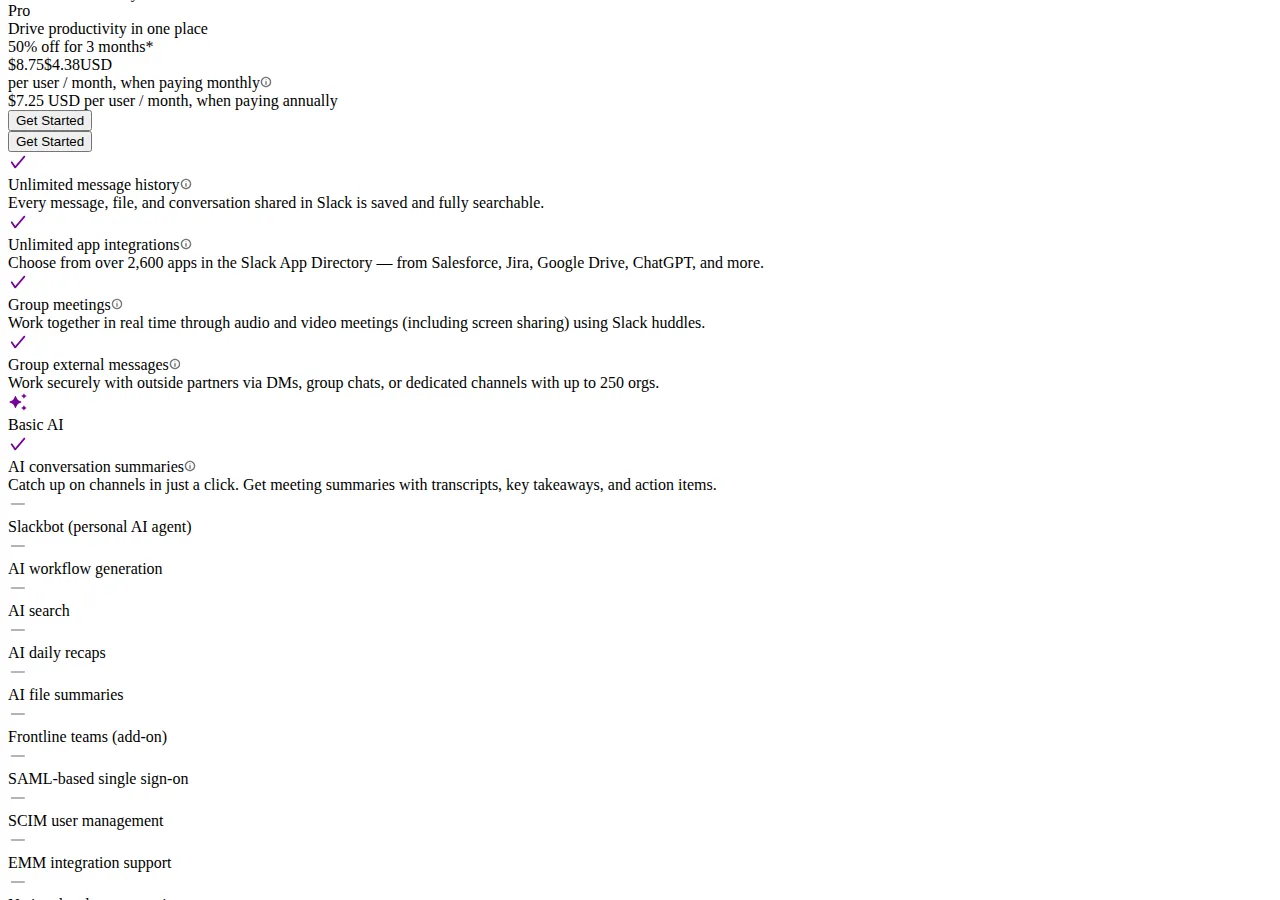
Slack's monthly-billing premium is the cleanest number on the page: Pro costs $8.75 a month when billed monthly against $7.25 annual, which is 21 percent more, and Business+ costs $18 against $15, which is 20 percent more.
Microsoft raised the prices of most Microsoft 365 business suites on July 1, 2026: Business Basic rose from $6 to $7 and Business Standard from $12.50 to $14, while standalone Teams Essentials stayed at $4 because standalone Teams SKUs were explicitly excluded from that update. The figures are stated as corroborated secondary reads because Microsoft's own pricing pages return a blocked shell from this network rather than the price table.
The worked cost: 5, 25, and 100 seats
The monthly cost formula is the same for every seat-based plan:
| Plan (annual billing) | 5 seats / year | 25 seats / year | 100 seats / year |
|---|---|---|---|
| Slack Pro ($7.25) | $435 | $2,175 | $8,700 |
| Slack Business+ ($15) | $900 | $4,500 | $18,000 |
| Teams Essentials ($4) | $240 | $1,200 | $4,800 |
| Microsoft 365 Business Basic ($7) | $420 | $2,100 | $8,400 |
| Microsoft 365 Business Standard ($14) | $840 | $4,200 | $16,800 |
| Microsoft 365 Business Premium ($22) | $1,320 | $6,600 | $26,400 |
| Discord Nitro Basic ($2.99) | $179.40 | $897 | $3,588 |
| Discord Nitro ($9.99) | $599.40 | $2,997 | $11,988 |
| Authority | Vendor pricing pages | Vendor pricing pages | Vendor pricing pages |
The arithmetic checks: 25 seats of Slack Pro at $7.25 is $181.25 a month and $2,175 a year; 25 seats of Teams Essentials at $4 is $100 a month and $1,200 a year; 25 individual Nitro subscriptions at $9.99 are $249.75 a month and $2,997 a year. Three-year totals at 25 seats are $6,525 for Slack Pro, $3,600 for Teams Essentials, and $8,991 for Nitro — a $5,391 gap between the cheapest and the dearest over three years. But the table hides the decisive number: a team that already pays for Microsoft 365 Business Basic pays $0 more for Teams, because the $7 per user is already on the invoice for email and documents. The marginal cost of Teams for that team is zero. The reverse is also true: a team with no Microsoft footprint that buys Business Basic only for Teams pays $7 a seat for a chat app it could have bought standalone at $4, plus email and storage it may not need.
The ceilings that force an upgrade
| Ceiling | Slack Free | Slack Pro | Teams Essentials | Discord free / Nitro |
|---|---|---|---|---|
| Message history | 90 days, then gone | Unlimited | Unlimited in the tenant | Unlimited in the server |
| Apps and integrations | Up to 10 | Unlimited | Microsoft 365 apps | Bots and integrations |
| Meetings | 1:1 huddles | Group huddles | 30 hours, 300 participants | Voice channels, HD streaming on Nitro |
| Storage per user | Not stated | Not stated | 10 GB | 50 MB uploads Basic, 1 GB Nitro |
| Guests and external users | 1:1 direct messages | Group messages with up to 250 orgs | Guest access in the tenant | Anyone can join a server |
| Admin control | Workspace admin | Workspace admin, SCIM on Business+ | Microsoft 365 admin center | Server owner only, no central billing |
| Authority | Slack pricing page | Slack pricing page | Corroborated 2026 reads | Discord Nitro page |
The ceiling that bites first is almost always Slack's 90-day history: a team that starts free and grows discovers at month four that its first quarter of decisions is unsearchable, and the only way back is the paid tier. The second ceiling is the Microsoft 365 business-plan cap of 300 users: beyond 300, the business plans stop and the team moves to enterprise licensing, which is quote-only. The third is Discord's missing administration: there is no way to buy Nitro for a team, no way to enforce who holds it, and no way to revoke it centrally.
Who should NOT pick each one
Do not pick Discord for a team that handles client data, health information, or anything under a retention policy: there is no admin console, no export, and no way to prove who saw what. Do not pick Slack if the whole company already pays for Microsoft 365 Business Basic or above — Teams is already bought, and paying $7.25 a seat for Slack on top of $7 a seat for the suite is paying twice for chat. Do not pick Teams Essentials if the team needs email or desktop Office apps: Essentials is chat and meetings only, and the upgrade path is the $7 Business Basic bundle, not a bigger Teams plan. Do not pick Slack Free for anything the team must be able to search in six months: the 90-day history limit is a hard delete of the record, not a soft cap. And do not pick any of the three on monthly billing without pricing the premium: Slack charges 20 to 21 percent more per month, which is $450 a year at 25 seats on Pro for nothing but the billing cycle.
Decision table
| Operator shape | The pick | Why | Annual cost at 25 seats |
|---|---|---|---|
| Startup on Google Workspace, 25 people | Slack Pro | No Microsoft footprint; unlimited history and real admin | $2,175 |
| Company already on Microsoft 365 Basic | Teams, inside the bundle | Marginal cost $0; email and storage already paid | $0 extra |
| Team that needs only chat, no suite | Teams Essentials | Cheapest real admin at $4 a seat | $1,200 |
| Open-source community, 100 volunteers | Discord free | No seats to buy; Nitro is optional per person | $0 |
| Regulated team, retention and offboarding | Slack Business+ or Teams in Premium | SAML, SCIM, and audit controls the free tiers lack | $4,500 / $6,600 |
| Authority | Vendor pricing pages | Vendor pricing pages | Vendor pricing pages |
The switching checklist
- [x] Step 1: Price the marginal cost, not the sticker. If Microsoft 365 is already on the invoice, Teams costs $0 extra; if it is not, Essentials at $4 is the honest Teams price.
- [x] Step 2: Count the history the team must keep. Slack Free deletes searchable history after 90 days; if the record matters, budget Pro from day one.
- [x] Step 3: Test the offboarding path. Remove a test account from each candidate and confirm the action is one console step, not a message to the person asking them to leave.
- [x] Step 4: Bill annually where the discount is real. Slack annual billing saves 20 to 21 percent over monthly; at 25 seats on Pro that is $450 a year.
- [x] Step 5: Check the 300-user cap. Microsoft 365 business plans stop at 300 users; a team growing past that needs enterprise licensing priced by quote.
- [x] Step 6: Keep Discord for community, not for the payroll. Use Discord where the audience is volunteers and the conversation is public; use Slack or Teams where the conversation is the company's record.
What this guide does not do
This guide prices the chat products, not the whole collaboration stack. The team-workspace pricing guide compares Notion, Airtable, and Coda on per-seat database pricing, which is the docs-and-databases half of the same buying decision. The engineering issue-tracker guide prices Linear, Jira, and ClickUp, which is where the work tracked in chat actually lives. And the project-management guide prices Asana, Monday, and Trello for teams that need tasks rather than threads. For the numbers behind the seat math, run the pricing calculator at 5, 25, and 100 seats before signing an annual contract — and confirm the Microsoft figures against the vendor's own pricing page at purchase time, because Microsoft's pages did not render from this network and the figures here rest on corroborated 2026 reads.
See our Intercom versus Drift versus LiveChat pricing playbook.